

Touch-type car-racing - touch-typing game
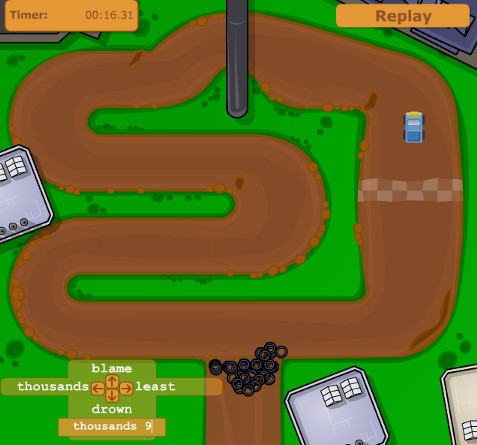
Touch-type car-racing is a captivating game helping to acquire quick and correct keyboarding skills.
The player controls movements of a car by typing commands on the keyboard. A random word with a numeric parameter determining the extent of a movement instruction corresponds to each movement instruction.
There exist two playing modes for the game: standard and network ones.
Network game results are recorded to the result table on the server enabling the player to compete with his colleagues.
Owing to various complexity levels of the speedway not only advanced users but also beginners can play the game.
Rules of the game
Player's task:
To drive the car around one circle of the speedway as quick as possible.
Commanding the car:
The car is commanded by a number of words typed with the help of the keyboard in the input string located in the lower left corner of the game window (or in the center of the window). One can move the input panel by "catching" the arrow with the mouse.
There are 4 driving commands:
- Move forward
- Move backward
- Turn left
- Turn right
To execute the necessary instruction, you should type the word indicated near the movement arrow in the input string.
Instructions for Move forward and turns have additional numeric parameters indicating the extent of each movement instruction.
Thus, "Move forward" instruction is valued from 0 (stop) to 5 (maximum drive speed).
Instructions for turns have values from 0 (moving straight) to 10 (maximum turning angle).
"Move backward" instruction does not have any numeric parameter.
Numeric parameters should be entered in a blank space after the typed instruction word.
For example, word "Sun" corresponds to movement forward. The instruction will be as follows:
"Sun 4"
Instruction input is completed by pressing "Enter". If a word (and a whole instruction) is typed correctly, the string gets empty, the car performs the instruction and the used word is replaced with a new one. If a word (and a whole instruction) is typed incorrectly, nothing occurs.
Delete the error with "Backspace" button and press "Enter".
The car must not go beyond speedway limits. It stops on reaching the road edge. In this case give "Move backward" instruction and then go on moving forward.
Speedway segments colored in brown imitate speedway defects. If the car comes across such a defect, its speed is double reduced.
Have a nice car-racing!
Top ⇑